

General configuration
i You will find the general settings of your SMS Gateway in the web interface under Configuration - General.
ê Click on the Save button at the bottom of the page after every change so that your settings are accepted.
Time

Always ensure that the set time of the SMS Gateway is correct. This is essential for Licencing for example.
The time is determined using the NTP server.
Character encoding for sending SMS messages
The character encoding used for sending SMS messages can be set globally here.
You can choose between UTF-8 and ISO encoding.

Servicing

Be notified by email if the signal strength is no longer sufficient to send or receive text messages.
Stop the sending of text messages or Telegram messages, e.g. during planned service work.
Statistics

NB: Configure a SMTP server for sending emails.
Hostname

Configure the host name and the domain of your SMS Gateway.
SMTP configuration
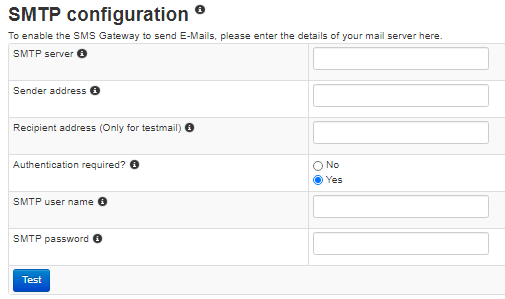
Where applicable configure user name and password for authentication.
SNMP
You can access the SNMP documentation here.
Webserver
Outdated TLS versions have been disabled. TLS 1.3 and 1.2 are available and comply with current security standards.

Select the encryption ciphers you want to be used by the web server of the SMS Gateway.
SSH
SSH access for our service staff is disabled by default.
This access can be enabled or disabled either through the web interface or via the console, should remote access be necessary.

Related articles